Search Death Records (United States)
 U.S. Newspapers, 50 State Full Search (1690-present)
- U.S. Obituary Database Search, (1696-present)
- U.S. Birth Announcements Database, (1700s-present)
Recording Cemeteries with Digital Photography
By Steve Paul Johnson - December 21, 1999
The use of a digital camera can help you record more tombstones in less time. Learn how to use this great new tool.
I had recorded several cemeteries, and on most days I can record about 250 to 300 tombstones before my hands and feet get too tired. In one hour, with my Palm III (handheld computer) I can record between 75 to 100 tombstones. In the past few months, I've been visiting the Hollywood Forever Cemetery (formerly Hollywood Memorial Cemetery), where there are over 80,000 interments. At my pace, it will take years to record.
Last month I purchased a Toshiba PDR-M5 digital camera. I initially bought it to capture photographs of cemeteries. But at my last visit to the Julian Pioneer Cemetery, I realized that I could just photograph the tombstones and then use the photos to enter data into my computer. I tried it and found I could photograph 100 tombstones in 30 minutes, and not feel tired at all. In fact, if I had more memory in my camera, I could have photographed a few hundred more.
I still found that some stones had to be recorded by hand, and those I recorded on my Palm III. For example, flush bronze plaques very difficult to photograph because of the dark background and dark lettering. Some plaques photographed ok, while others just didn't seem to come out. So, I hand recorded those. Tombstones in shady areas were also hard to photograph because of the low lighting. Then there are those tombstones that are too weather-worn that even human eyes have trouble figuring them out.
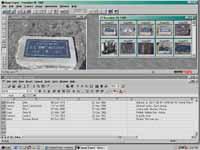 |
| The workspace on my computer. The digital photos on top with an Excel spreadsheet on the bottom. Click graphic to enlarge. |
Photographing the tombstones will allow you to capture more tombstones while at the cemetery. You still have to view each image and key the data into your computer. But this you can do in the comfort of your home, even at night, when it's raining. Try recording a tombstone at night or in the rain.
Once you've finished entering data from the images, you can delete them from your camera, and go photograph more tombstones.
Finding the Right Camera
For purposes of recording tombstones, I suggest getting a camera with the following features:
- Optical Zoom (as opposed to Digital Zoom)
- LCD Monitor
- Supports low resolutions
- Minimum 16Mb Internal Memory, and minimum 16Mb External Memory
- USB Interface
- Lithium Ion Battery
Optical Zoom
Most all digital cameras support "digital" zoom, but not all support "optical zoom". Optical zoom is the "normal" zoom that we are accustomed to with film cameras. It is where a telephoto lens extends out from the camera for close up shots. Digital zoom doubles the size of the center of the photograph.
With digital zoom, the photograph must be taken first, and then zoomed. This is because the camera cannot double the center the of the photograph if haven't taken the photograph yet. The resulting photo is not as sharp as that produced with optical zoom. This is because digital zoom takes the same pixels in the photo, and doubles them. Whereas with optical zoom, new pixels are added to the image to produce more detail.
Optical zoom is better because you get more detailed images, and you can increase or decrease the size of the object before you take the photograph. The disadvantage with optical zoom is that it adds more cost to the camera, and uses up more battery charge to power the lens.
LCD Monitor
 |
| This is the camera that I have. The large black square on the back is the LCD Monitor. |
Most all digital cameras have an LCD Monitor on the back of the camera. An LCD monitor actually shows you what your photo will look like before you take the picture. After you have taken a photograph, you can use it too see how it turned out. When it comes to tombstone photography, you can verify if the inscriptions are readable, or if the lighting is too dark, etc.
You want to make sure the camera you purchase has an LCD monitor. It can be frustrating to come home only to find out that several tombstones are unreadable. Several low-budget digital cameras do not have LCD monitors.
Low Resolution Photography
When most people purchase a digital camera, they look for high resolution capability. The higher the resolution, the bigger the photograph, and the more detail you can capture. But with high resolution photographs demand lots of memory. To support capturing hundreds of tombstone photographs in a single cemetery visit, you are going to need to low resolution photography.
The lowest resolution my camera will support are images at 800 x 600 pixels. Other cameras will go down lower to 640 x 480 pixels, requiring even less memory. However, the lower the resolution, the less detail your photographs will capture. 800 x 600 pixels is perfect.
JPEG compression is another factor. When a digital camera stores a photograph in memory, it compresses it down so that it uses up less memory. More compression requires less memory. However, more compression causes a degredation of the image. I've found that an 800 x 600 pixel image with 1/16th compression produces photographs at about 50k in memory and still retain enough detail to read inscriptions.
Memory
 |
| External memory cards are used to extend the camera's internal memory. Cards range from 4Mb to 96Mb, and range from $20.00 to $200.00 |
Digital cameras store photographs in memory chips. The more memory available, the more photographs can be stored. All cameras have "internal" memory, which refers to memory chips that are permanently fixed inside the camera. A lot of cameras have 8Mb of internal memory, a lot more today have 16Mb.
External memory (also known as a "memory card") refers to a chip that you can insert into the camera to extend the amount of memory to store photographs on. Most all cameras support external memory. Some cameras even come with an 8Mb memory card. With 16Mb of internal memory and 8Mb of external memory, you can store about 100 photos at 800x600 pixels with 1/16th JPEG compression.
USB Interface
The Univeral Serial Bus Interface makes transferring photographs to your computer really fast. Only few digital cameras have a USB interface. Most others transfer photographs using a serial or parallel connection. Serial connection is the slowest, as well as the most widely used. Parallel is faster, but not as fast as USB.
When you have captured 200 to 300 tombstones photographs, and each photograph averages 50K in file size, you could spend an hour transferring photographs to your computer. With USB, all of the photographs will transfer in 30 seconds.
But before you buy a camera with USB interface, make sure your computer has a USB port. USB ports seem to be standard on computers sold since the beginning of 1999. Prior to then, you need to check your computer.
Lithium Ion Batteries
Because of the mobile nature of digital cameras, you need reliable long lasting power. Lithium ion batteries are state of the art in battery power. However, most cameras do not support lithium ion batteries. Rather, nickel metal hydride batteries are most common.
Nickel metal hydride (NiMH) batteries have a tendency to degrade if they are not recharged properly. You have to completely discharge all power from a NiMH battery before charging it or else it will degrade and lose its ability to hold a charge. Lithium ion batteries, on the other hand, can be charged without having to discharge them.
When you are photographing hundreds of tombstones in a single day, you need as much power as possible, especially when you are adjusting the optical zoom, and using the LCD monitor to review photographs. There are some digital cameras out there that use lthium ion batteries. The PDR-M5 is an example of one.
Photographing Tombstones
When I photograph a tombstone I view the image in the LCD monitor, and then zoom in on the inscriptions so that they fit inside the monitor. If you can see it in the monitor, it will be captured on the photograph. The same is not always true if you use the optical viewfinder. On many digital cameras, the image in the viewfinder is usually smaller than the actual photograph, meaning that the photograph will capture more image than the viewfinder shows.
 |
| Even at 200 pixels in width, the inscriptions can still be read in this thumbnail image. Click image to enlarge. |
Don't worry about focusing the image. All digital cameras have auto-focus. Just make sure the inscriptions fit inside the LCD monitor.
Some tombstones are so big or so long that you have to zoom out to capture all the inscriptions. As a result, the inscriptions become too small to read. You may have to photograph pieces of the tombstone to capture the complete inscription.
I've found that it helps to photograph the tombstone at an angle so as to capture more shadow within the inscription. This causes the inscription to become more easily readable.
The lettering on flush bronze plaques do not seem to photograph well. The dark lettering on the dark brackground just makes it hard to read. I usually end up recording those markers directly into my Palm III.