Search Death Records (United States)
 U.S. Newspapers, 50 State Full Search (1690-present)
- U.S. Obituary Database Search, (1696-present)
- U.S. Birth Announcements Database, (1700s-present)
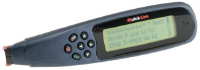 Wizcom
QL-1000 Quicklink Handheld Scanner
Wizcom
QL-1000 Quicklink Handheld Scanner
By David Podmajersky, December 21, 2000
This handheld, battery powered scanner is making a lot of noise among genealogists because of its portability and ability to scan text from books, and transfer into your PC or laptop.
In the course of my genealogical wanderings, I have come to appreciate optical character recognition (OCR, for short) software. Anyone who has typed a lengthy obituary or other important document into their PC knows what I mean. I can pump out a paragraph in short order when the subject comes from my brain but copying any sort of text from a book is always a painful process.
A scanner with OCR software is a great boon to the even the casual genealogist. However, one is likely to raise more than a few unfriendly eyebrows with the commotion caused setting up a desktop PC on one of the spacious tables in his local library. Even if he doesn't lose his library privileges over the fiasco, he will most likely not be able to find enough power outlets to make the thing work unless he also brings a portable car battery. Its not a pretty picture!
Into the fray comes the OCR pen. This device is about the size of a large highlighter and almost as easy to use. The OCR pen runs on regular batteries and fits nicely into your breast pocket and even I was able to figure out how to scan text in under 5 minutes.
I heard about OCR pens from a friend and decided I had to have one immediately. I purchased the most highly recommended product, Wizcom Quicklink Pen - Portable Optical Pen Scanner, from Buy.com for $125 and received it a few days later. The pen came with not only the usual operator's manual, but also a "quick start" guide which had me scanning in minutes.
|
At a Glance |
|
Price: $125.00 to $150.00 Capacity: 100 pages of text Connectivity: PC, laptop, PDA, mobile phone Resolution: 300 x 300 DPI Languages: Recognizes 8 different languages |
Lest I forget, it does take some doing to get used to lining up the text with the correct point on the pen. I was able to get the hang of it after an hour or two of steady scanning but each time I sit down to scan in a few lines I find myself making errors for the first few minutes. I should also note that if you are a person who suffers from any sort of arthritic pain in the hands, this product is not for you as the strain on the hand is a bit more than that caused by very heavy mouse usage.
I started with some pretty large and clear text on a piece of paper positioned on my kitchen table. My first scan was about 25 or so characters and the pen only made one error which I corrected fairly easily after a few false starts. Next I scanned a thin pamphlet with very small type. Again I sat comfortably at my kitchen table and rolled the pen over the text at a nice even speed. This time the pen made 3 errors in about the same number of characters. Correcting multiple characters was a bit more difficult at first but once you get the hang of it, its not too bad, though somewhat time consuming. The pen has a nice feature which allows the user to quickly disgard and rescan really bad results when the user's hand slips a bit.
My next forays with my new found best friend involved text I found in some thicker books. First I scanned with a book left to its own devices sitting on a table. Unfortunately the pen made many errors so I wrestled the book as flat as I could on the table with my free hand. This time the pen did better but not particularly well. It seemed to keep missing the same characters and character sequences. The pen also frequently made CAPS out of lower case and lower case out of caps. Lower case L's were a problem as the pen frequently substituted numer ones for l's. The pen also had some trouble picking up the letters Q, R, E and o, e, r. Even when I gave it my all and got the book very flat, there were many errors probably caused by the curvature of the page near the spine.
I really wanted this thing to work for me because there are so many times I am working at the library and need to copy a couple paragraphs or a few lines from several pages of a book in the reference section. I despise having to trek out to the car and lift up my floor mats in a search for coins. But after a few days my wife began to make fun of my repeated attempts to scan some fairly simple though lengthy text from a very thick book. She let me know that she would be happy to contact Buy.com and request a refund. After a day or two of this I agreed that my enthusiasm alone would not make this thing work for me.
For now at least I carry a little plastic bag filled with nickels, dimes, and quarters for the copy machine. I bring home pages and pages of new copies and sit at my HP Scanjet desk top scanner happily scanning away. The number of errors are fairly minimal on a desk top scanner and the money I almost spent on the OCR pen pays for a whole lotta copies!
- David Podmajersky
David is the creator of DistantCousin.com, a genealogy website for helping people locate distant cousins, including online queries, military databases, cemetery transcriptions, and surname resource centers.
Purchase this product online at Amazon.com